


Creating a login form using HTML and CSS

0
13K

Creating a login form using HTML and CSS is a fundamental skill in web development. Here's a step-by-step guide to building a simple and responsive login form:
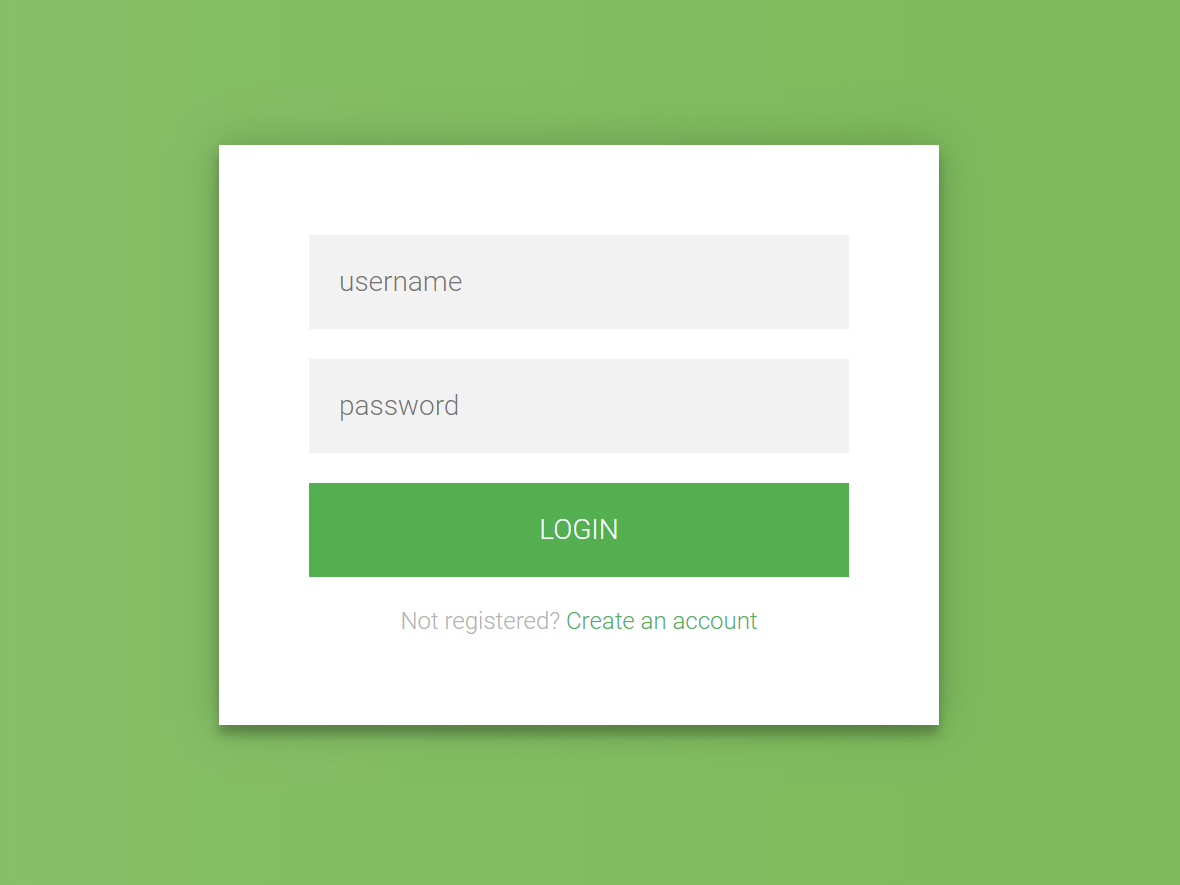
1. HTML Structure

Begin by setting up the basic HTML structure for the login form. This includes a container for the form elements such as the username and password fields, and a submit button.

html
<!DOCTYPE html> <html lang="en"> <head> <meta charset="UTF-8"> <meta name="viewport" content="width=device-width, initial-scale=1.0"> <title>Login Form</title> <link rel="stylesheet" href="styles.css"> </head> <body> <div class="login-container"> <h2>Login</h2> <form action="/login" method="post"> <label for="username">Username</label> <input type="text" id="username" name="username" required> <label for="password">Password</label> <input type="password" id="password" name="password" required> <button type="submit">Login</button> </form> </div> </body> </html>

Explanation:

  • The <form> element wraps the input fields and the submit button.
  • Each <label> is associated with an <input> field, enhancing accessibility.
  • The required attribute ensures that users cannot submit the form without filling in these fields.

2. CSS Styling

Next, style the form to make it visually appealing and responsive.

css
 
/* styles.css */ body { display: flex; justify-content: center; align-items: center; height: 100vh; margin: 0; font-family: Arial, sans-serif; background-color: #f2f2f2; } .login-container { width: 100%; max-width: 400px; padding: 20px; background-color: #fff; box-shadow: 0 0 10px rgba(0, 0, 0, 0.1); border-radius: 8px; } h2 { text-align: center; margin-bottom: 20px; } label { display: block; margin-bottom: 5px; font-weight: bold; } input[type="text"], input[type="password"] { width: 100%; padding: 10px; margin-bottom: 15px; border: 1px solid #ccc; border-radius: 4px; box-sizing: border-box; } button { width: 100%; padding: 10px; background-color: #4CAF50; color: white; border: none; border-radius: 4px; cursor: pointer; font-size: 16px; } button:hover { background-color: #45a049; }

Explanation:

  • The body is styled to center the login form both vertically and horizontally.
  • The .login-container class styles the form container with a fixed width, padding, background color, shadow, and rounded corners.
  • Input fields and the button are styled for better user experience, with padding, borders, and hover effects.

3. Responsive Design

To ensure the form is responsive on various screen sizes, the .login-container is set to a maximum width and uses percentage-based widths for its elements. This allows the form to resize appropriately on different devices.

Love
1
Căutare
Categorii
Citeste mai mult
Computer Programming
Functions, Parameters, and Return Values in python
Python uses functions extensively! Here's how functions, parameters, and return values work in...
Computer Programming
Programming basics
Computer programs are used by people every day. Everytime you use your smartphone, tablets, and...
Technology
CSS - Styling Web Pages
Cascading Style Sheets (CSS) is a cornerstone technology of the World Wide Web, alongside HTML...
By ALAGAI AUGUSTEN 2024-07-26 17:44:53 0 27K
Educaţie
Unlock Your Potential with Lifelong Learning
In today’s fast-paced, ever-changing world, the concept of lifelong learning has become...
By ALAGAI AUGUSTEN 2024-07-21 19:03:27 0 16K